Basic Programming Terms : Variables , Predefined Types , Constant , Keywords & Identifiers

1. Identifiers
Description :
These are the names you give to things you create in your code, like variables, constants, or classes. It’s like naming your pet—you pick a name, but it has to follow some rules (e.g., no spaces, can’t start with a number).
Scope: This is about where in your program a variable or constant can be used. It’s like deciding if a toy is only available in one room (local scope) or the whole house (global scope).
Rules for Identifiers:
Can include letters, numbers, and underscores (_).
Must start with a letter or underscore.
Can’t be a keyword (e.g., int or class).
Use Cases:
Naming variables to store data (e.g., userAge, totalPrice).
Defining constants for fixed values (e.g., MaxAttempts).
Controlling access to variables in different parts of the program (e.g., local variables in a method vs. global variables in a class).
Invalid Identifiers
Refers to names used for variables, functions, classes, etc., that don't follow the naming rules of the programming language you're using
Examples :
2cool : Starts with a digit.
- Valid Alternatives : cool2
first-name : Contains a hyphen.
- Valid Alternatives :
first_name,firstName
- Valid Alternatives :
class : Reserved keyword
- Valid Alternatives :
className,_class
- Valid Alternatives :
user name : Contains a space
- Valid Alternatives:
user_name,userName
- Valid Alternatives:
total$amount : Special character
$- Valid Alternatives: total_amount
Note : If you're getting an "invalid identifier" error, check:
Typos
Special characters
If the name is a reserved keyword
2. Pre-defined Types
Predefined types are like the basic ingredients C# gives you to work with, like flour, sugar, or eggs in baking. They’re the building blocks for storing things, like numbers, words, or true/false values.
Common Types
| Sn | Type | C# Keyword | Values |
| 1. | Integer (Whole Numbers) | int | 0,1,2,3 ,… |
| 2. | Character | char | C, K ,@ , 2, |
| 3. | Boolean | bool | true , false |
| 4. | String ( | string | “Ade is good”, “I am 5 years Old” |
| 5. | Float (Decimal Numbers) | float or double | 2.45, 4.8564 |
| 6. | Money ( Monetary decimal Numbers) | decimal | 500.00M , 120M , … |
Use Case:
If you want to store someone’s age, you use the int type (for whole numbers). If you want their name, you use the string type (for words).
Code Example: Using Pre-defined Types in C#
using System;

class Program
{
    static void Main()
    {
        // Predefined types
        int age = 25;              // Whole number
        double height = 5.9;       // Decimal number
        string name = "Charlie";   // Text
        bool isStudent = true;     // True or False
        char grade = 'A';          // Single character
        decimal amount = 5.9M;       // Decimal number for Money

        Console.WriteLine($"Name: {name}");
        Console.WriteLine($"Age: {age}");
        Console.WriteLine($"Height: {height} feet");
        Console.WriteLine($"Is Student: {isStudent}");
        Console.WriteLine($"Grade: {grade}");
    }
}
C# has ready-made types like int (numbers), string (text), bool (true/false), and others. You pick the right type for what you’re storing, just like picking the right ingredient for a recipe.
3. Keywords
Keywords are special words that C# reserves for its own use. They’re like instructions the language understands, so you can’t use them as names for your variables or constants. Think of them as the “command words” the computer listens to.
Use Cases:
Defining program structure (e.g., class, if, for).
Specifying data types (e.g., int, string).
Controlling program flow (e.g., break, return).
Examples of Keywords:
int, string, double (for data types).
if, else, for, while (for control flow).
class, static, void (for defining program structure).
Scenario: A program checks if someone is an adult based on their age.
- Keywords Used: int (to define the age variable), if and else (to make a decision).
using System;

class Program
{
    static void Main()
    {
        // Using keywords: int, if, else
        int age = 20;

        if (age >= 18)
        {
            Console.WriteLine("You are an adult.");
        }
        else
        {
            Console.WriteLine("You are a minor.");
        }
    }
}
// Output :
You are a minor.
Output :
Note: Keywords can not be used as a name of things you define in your code . The Compiler already set a meaning to them so they are not valid identifiers. Only Valid identifiers you can use in naming stuff in your code like variables , constants , classes , methods etc.
4. Variables
A variable is like a labeled box where you can store information, like a number or text, and change what’s inside the box whenever you need to. It’s a way to keep track of data in your program.
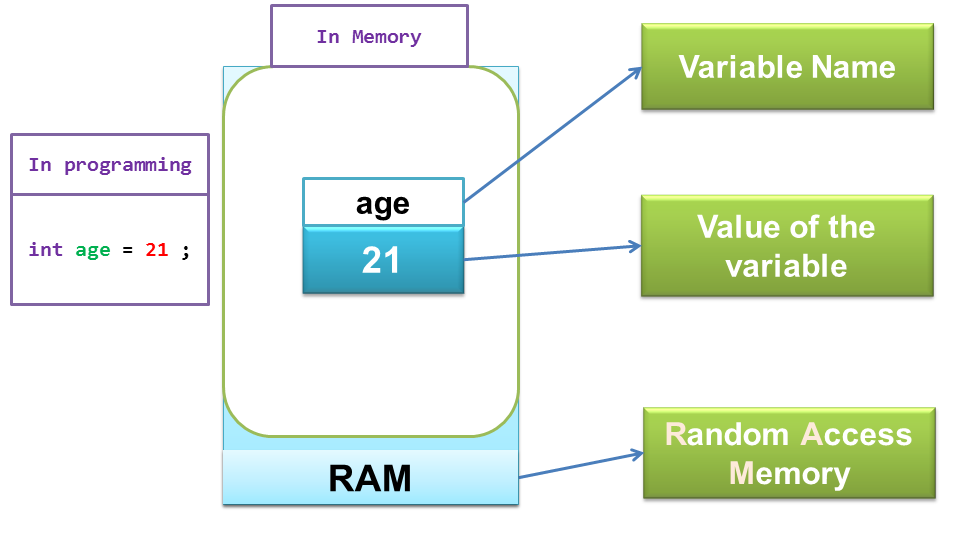
Variables: Changeable storage boxes for data
Use Cases:
Storing user input (e.g., a player’s name in a game).
Keeping track of numbers for calculations (e.g., a score or total price).
Holding temporary data, like a counter in a loop.
Code Example: Creating Variable in C#
using System;

class Program
{
    static void Main()
    {
        // Declare a variable to store a player's name
        string playerName = "Alice";
        // Declare a variable to store a score
        int score = 100;

        Console.WriteLine($"Player: {playerName}, Score: {score}");

        // Change the variable values
        playerName = "Bob";
        score = 150;

        Console.WriteLine($"Player: {playerName}, Score: {score}");
    }
}

// Output
Player: Alice, Score: 100
Player: Bob, Score: 150
Example:
Scenario: A game tracks a player’s score.
Variable: score holds the value 100. Later, it changes to 150 when the player earns more points.
Console.Writeline() : This is how you display on a Console(Terminal) the value stored in your variable
5. Constants
A constant is like a variable, but its value is locked in and can’t be changed once set. It’s like writing a value in permanent marker on a box—you can’t erase or overwrite it.
Constants: Unchangeable values
Use Cases:
Defining fixed values like tax rates or mathematical constants (e.g., π).
Setting configuration values that shouldn’t change, like maximum retries in a program.
Ensuring critical values remain unchanged to avoid bugs.
Code Sample:
using System;

class Program
{
    // Declare a constant for the tax rate
    const double TaxRate = 0.08;

    static void Main()
    {
        double price = 100.00;
        double tax = price * TaxRate;

        Console.WriteLine($"Price: ${price}, Tax: ${tax}, Total: ${price + tax}");

        // This would cause an error: TaxRate = 0.10; // Constants can't be changed
    }
}
Example:
Scenario: A shopping app calculates tax on a $100 item using a fixed tax rate of 8%.
Constant: TaxRate is set to 0.08 and never changes.
Output :